


Keep the day moving.
Compare the calendar, customer updates and the field handoff. See how Housecall Pro and JobsiteOn handle the work around each visit.
A calendar your crew can work from.
 Enlarge
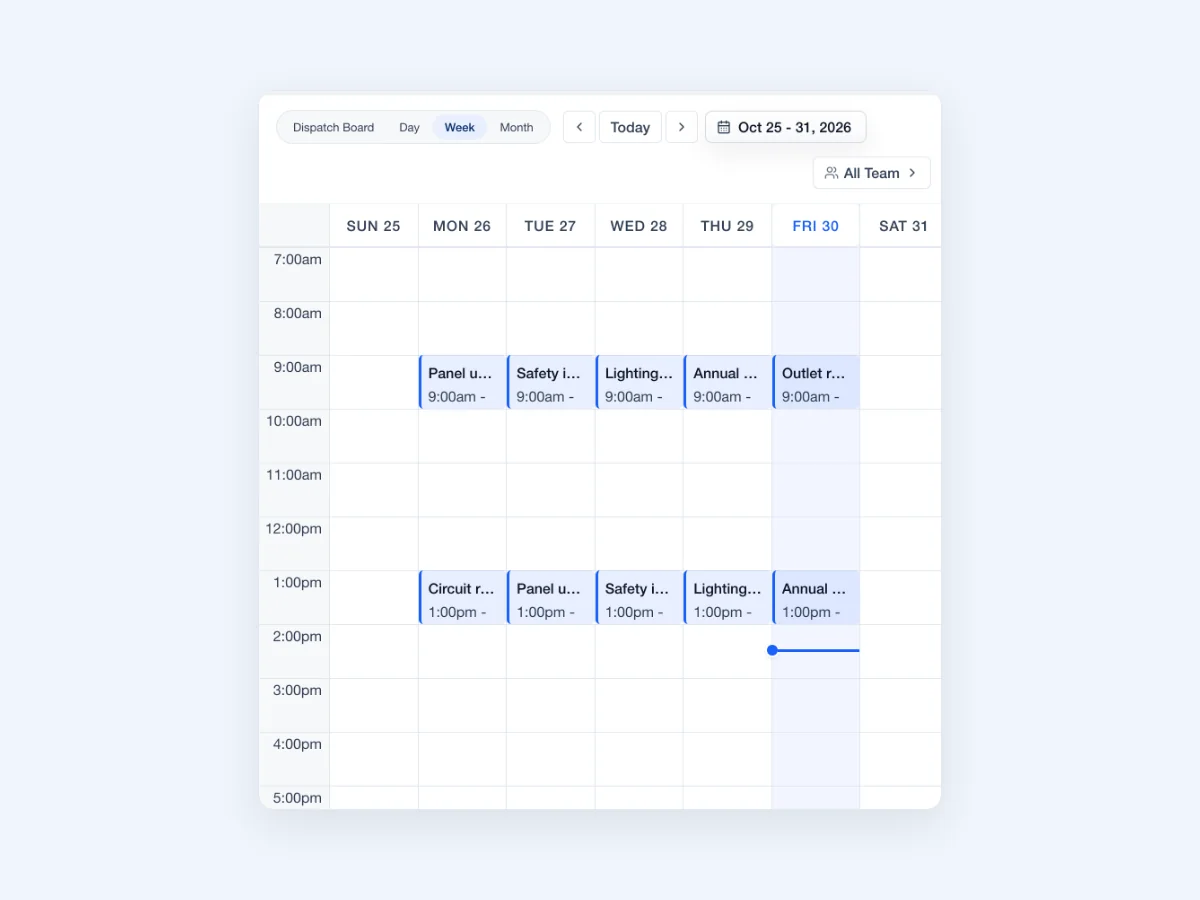
Actual JobsiteOn app capture with sample records. Product panel shown.
Explore Schedule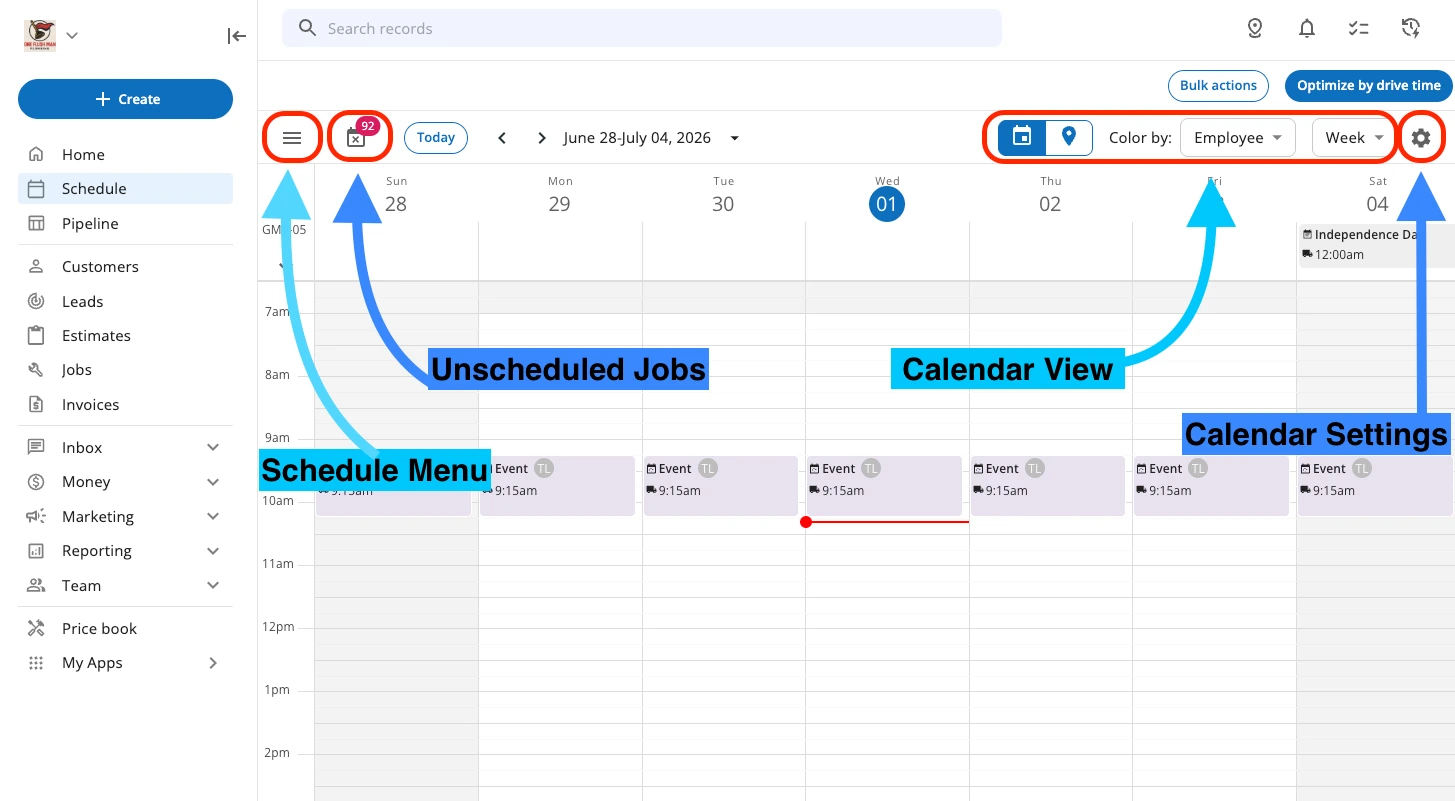 Enlarge
Housecall Pro’s help-center calendar screenshot. The colored arrows and labels are its original navigation annotations.
View the original sourceCompare the weekly view, then try changing a visit. The important part is whether the right people can find the updated time and job details.
Vendor-published views, captured November 2, 2026. Sample data and screen scope differ. Open either image to inspect it; appearance and availability can vary by release.
The right fit for your day.
Choose around the work your team repeats. These are starting points for your evaluation, not a universal ranking.
You want the whole job in view.
Try JobsiteOn when you want the visit, crew, job photos and payment record close together. Use one real service job to test the whole path.
Check included productsHome service operations.
Shortlist Housecall Pro when its home-service workflow fits your business, including scheduling, online booking, estimates, invoicing and customer communication tools.
Read Housecall Pro’s product detailsCompare the work, step by step.
Both products have useful capabilities. Read the details, check the source and try the task that matters to you.
The daily schedule
Try thisFind tomorrow’s appointments and isolate one employee’s work.
Use day, week and month views to see visits and available time.
Product detailsCalendar views include schedule, dispatch, day, week, month and employee-focused views.
Vendor source: Housecall Pro: use the schedule tabChanges during the day
Try thisMove a visit and check the employee’s view before considering the task finished.
Dispatch shows the crew’s assignments and unassigned work on a shared board.
Product detailsDrag-and-drop scheduling supports assigning and moving jobs, with route and map tools.
Vendor source: Housecall Pro: scheduling softwareCustomer conversations
Try thisCheck what the customer receives when a time changes, including the sender and reply path.
Communications brings messages together with customer and work context.
Product detailsScheduling tools include appointment reminders and on-my-way customer messages.
Vendor source: Housecall Pro: scheduling softwareQuotes through payment
Try thisFollow one accepted estimate through the job and the final payment.
Sales and Payments cover quotes, invoices and payment records.
Product detailsEstimates, invoicing and payment tools are part of its published feature set.
Vendor source: Housecall Pro: product featuresPlan scope
Try thisPrice the exact users, booking tools, communication features and reporting you need.
Schedule starts at Starter. Dispatch, Capture and Assets are included on Team and higher plans.
Product detailsPlans differ by users and features; check optional products and billing terms for your team.
Vendor source: Housecall Pro: plans and pricingKeep the visit connected to the work.
In JobsiteOn, test the handoff between the person booking the appointment and the person standing at the customer’s door.
- 01
Find a time
Read the week and book the visit.
Explore schedule - 02
Give the crew context
Keep the visit and job details together.
Explore service - 03
Show the completed work
Add the photos and video your office will need.
Explore capture - 04
Collect payment
Return to the job’s billing record after the visit.
Explore payments
Product availability depends on your plan. See plans, user limits and job allowances.
Price the way you work.
Housecall Pro publishes plans and billing options. Compare the plan that supports your user count and required features, including any extras. Match that to JobsiteOn’s user and job allowances and the same billing period.
JobsiteOn, billed monthly
- Starter
- $29/month
- Team
- $99/month
USD. User and job allowances apply. Capture and Dispatch start at Team.
Ask before you commit
- How many office and field users does the quoted plan include?
- Which customer communication or booking features cost extra?
- What are the payment processing fees and annual commitment?
Compare the same users and billing term. Confirm taxes, processing fees, add-ons and contract conditions.
Give both products the same test.
Use a real job and involve the people who do the work. Check each step when you have tried it in both products, then take the checklist with you.
Start Free TrialA few useful answers.
Does Housecall Pro support more than one calendar view?
Yes. Its help center documents schedule, dispatch, day, week, month and employee-focused views. Compare the view your dispatcher and crew would actually use.
Does JobsiteOn require Team for scheduling?
Schedule is included from Starter. The Dispatch crew board, Capture and Assets start at Team. Review the pricing page for the current user and job allowances.
Which product should I try first?
Start with the workflow causing the most repeat work: booking visits, updating the customer, documenting the job or collecting payment. Use the same example in both products and include the people who do those tasks.
Sources you can check.
Written by JobsiteOn using its product documentation and the official vendor pages linked here. Reviewed November 2, 2026. This is a product guide, not an independent benchmark or a claim that one tool suits every team.
Screenshots preserve the published interface and original annotations. Capture dates do not establish release versions. Third-party names and images belong to their owners; no affiliation or endorsement is implied.
Screenshot credits and capture methodPut JobsiteOn to work.
Bring a real quote, a real visit and the people doing the work. See how it fits your day.