


Make the next job clear.
Compare crew boards, scheduling and operational depth. See how JobsiteOn’s daily workflow stacks up against ServiceTitan and its optional Pro products.
See who is going where.
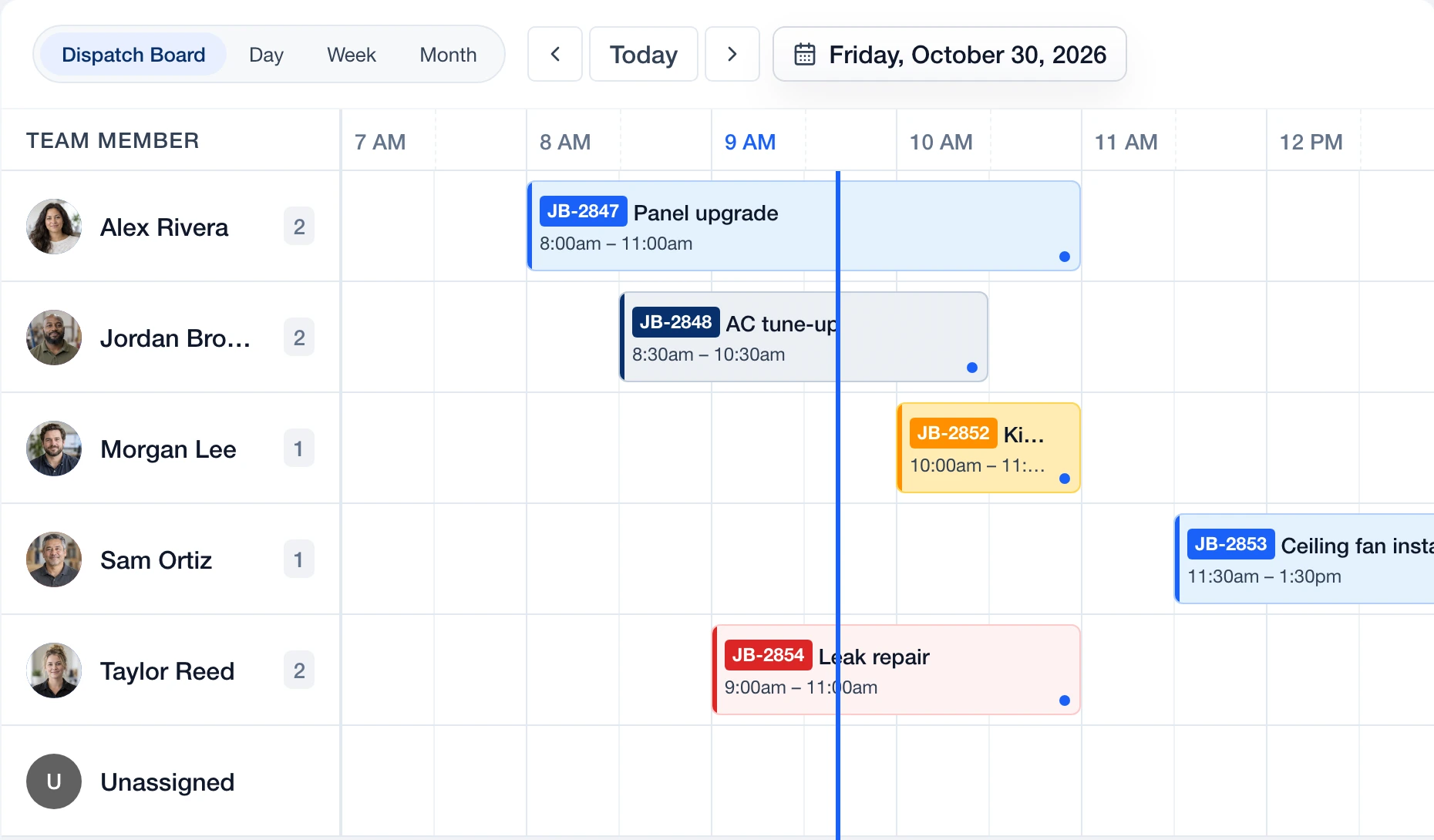 Enlarge
Actual JobsiteOn app capture with sample records. Product panel shown.
Explore Dispatch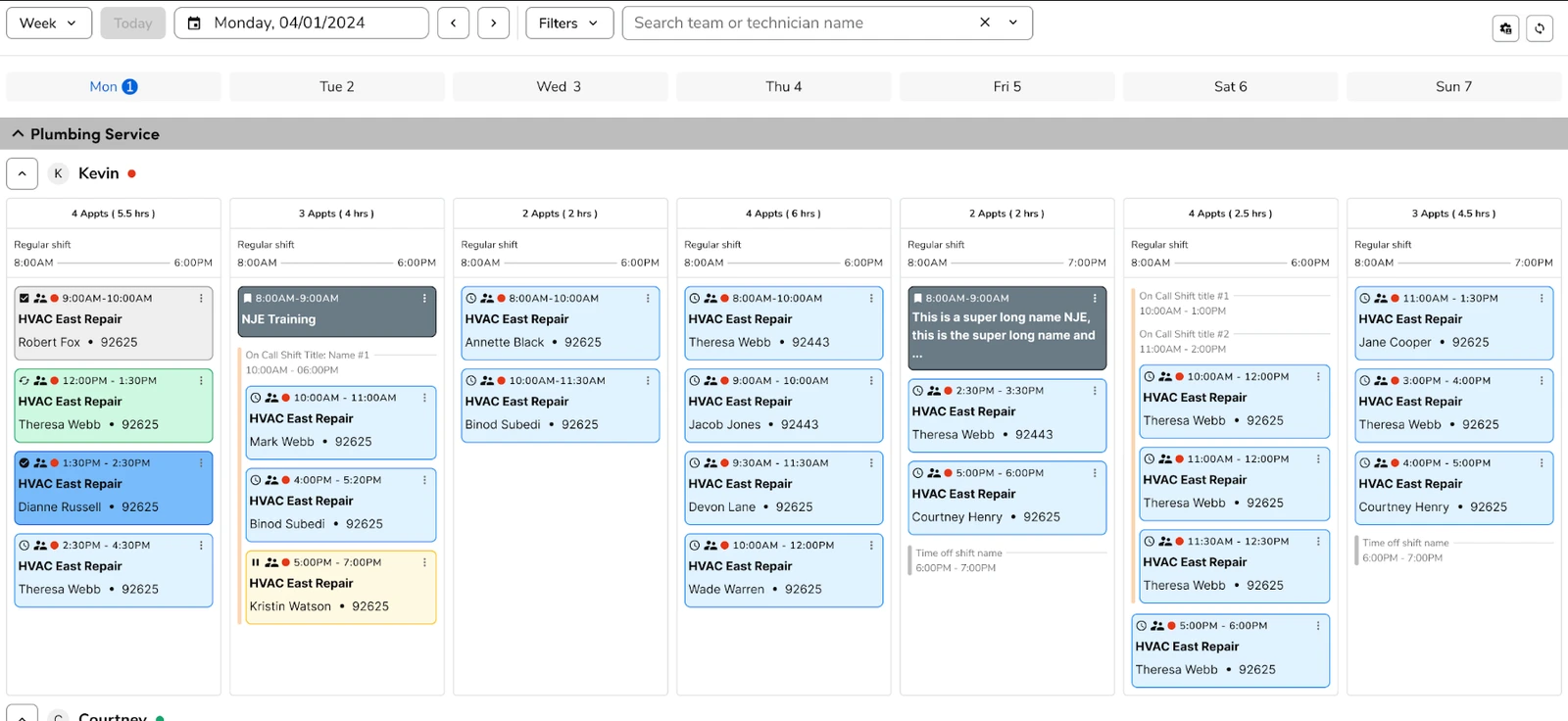 Enlarge
ServiceTitan’s published weekly-board screenshot. Its separately documented redesigned board is in early access for selected accounts.
View the original sourceJobsiteOn’s day board and ServiceTitan’s weekly board use different views of crew capacity. Enlarge both, then test a late job and an urgent new call.
Vendor-published views, captured November 2, 2026. Sample data and screen scope differ. Open either image to inspect it; appearance and availability can vary by release.
The right fit for your day.
Choose around the work your team repeats. These are starting points for your evaluation, not a universal ranking.
You want the whole job in view.
Try JobsiteOn when the immediate need is to quote work, schedule visits, assign crews and keep job evidence together. Start with your current team and the published plan allowances.
Check included productsDispatch & operations.
Shortlist ServiceTitan when you need a broader operations rollout, including its dispatch tools and optional Pro products. Evaluate the exact package and implementation scope for your business.
Read ServiceTitan’s product detailsCompare the work, step by step.
Both products have useful capabilities. Read the details, check the source and try the task that matters to you.
Assigning the next job
Try thisAdd an urgent call and find a person who can take it without hiding an existing commitment.
Use the crew board to see assignments, times and unassigned work.
Product detailsDrag-and-drop dispatch with job details and tools for managing technician schedules.
Vendor source: ServiceTitan: dispatch softwareSeeing the week
Try thisFind a half-day opening next week and account for the crew’s other jobs.
Day, week and month calendar views show booked visits.
Product detailsThe weekly board supports technician and team views, filters and appointment details.
Vendor source: ServiceTitan: use the weekly dispatch boardAutomatic dispatch
Try thisSeparate features you can use now from add-ons, early access and roadmap items.
Evaluate the current crew board. AI Foreman is marked Coming Soon on the public product page.
Product detailsDispatch Pro is a separate product for automated assignment using factors such as skills and location.
Vendor source: ServiceTitan: Dispatch ProThe job handoff
Try thisAsk a technician to find the customer’s instructions and record what changed on site.
Service keeps the visit, crew and job details together; Capture adds the visual work record.
Product detailsDispatch tools surface job and customer information for the office and technicians.
Vendor source: ServiceTitan: dispatch softwareBuying and rollout
Try thisGet users, implementation, add-ons, term and support included in the written offer.
Published plans describe user and job allowances. Trial the workflow before choosing a plan.
Product detailsPricing is quoted per technician, with package scope determined for the business.
Vendor source: ServiceTitan: packages and pricingGive the office and crew the same job.
The board is the start of the handoff. In JobsiteOn, follow a scheduled job through the crew’s work and back to the office for billing.
- 01
Book the work
Put the visit on the shared schedule.
Explore schedule - 02
Assign the people
Read the crew board and choose an available team member.
Explore dispatch - 03
Keep the evidence
Attach the site photos and work details to the job.
Explore capture - 04
Finish the paperwork
Find the job and customer record when preparing the invoice.
Explore payments
Product availability depends on your plan. See plans, user limits and job allowances.
Price the way you work.
ServiceTitan asks businesses for a tailored, per-technician quote. Do not substitute an estimated internet price for that offer. Compare the package, Pro products, rollout work and contract terms with the JobsiteOn plan you would actually use.
JobsiteOn, billed monthly
- Starter
- $29/month
- Team
- $99/month
USD. User and job allowances apply. Capture and Dispatch start at Team.
Ask before you commit
- Which dispatch capabilities are in the base package and which require Pro?
- What does implementation include, and who owns the setup work?
- What is the total commitment for your technician count and term?
Compare the same users and billing term. Confirm taxes, processing fees, add-ons and contract conditions.
Give both products the same test.
Use a real job and involve the people who do the work. Check each step when you have tried it in both products, then take the checklist with you.
Start Free TrialA few useful answers.
Is Dispatch Pro the same as ServiceTitan’s dispatch board?
No. ServiceTitan documents a dispatch board and a separate Dispatch Pro product for automated assignment. Confirm which capabilities are included in your proposed package.
Does JobsiteOn currently offer AI dispatch?
This comparison covers JobsiteOn’s current scheduling and crew board. AI Foreman is marked Coming Soon on the public site and should not be treated as an available reason to switch.
Is JobsiteOn always cheaper than ServiceTitan?
A universal price claim would be misleading. ServiceTitan provides tailored per-technician pricing. Compare its written quote, required add-ons and rollout costs with the JobsiteOn plan and allowances your team needs.
Sources you can check.
Written by JobsiteOn using its product documentation and the official vendor pages linked here. Reviewed November 2, 2026. This is a product guide, not an independent benchmark or a claim that one tool suits every team.
Screenshots preserve the published interface and original annotations. Capture dates do not establish release versions. Third-party names and images belong to their owners; no affiliation or endorsement is implied.
Screenshot credits and capture methodPut JobsiteOn to work.
Bring a real quote, a real visit and the people doing the work. See how it fits your day.