


Keep everyone on the same job.
Compare a changed visit, the crew’s instructions and the record needed to finish the job. See Jobber and JobsiteOn side by side.
Compare the week, then change it.
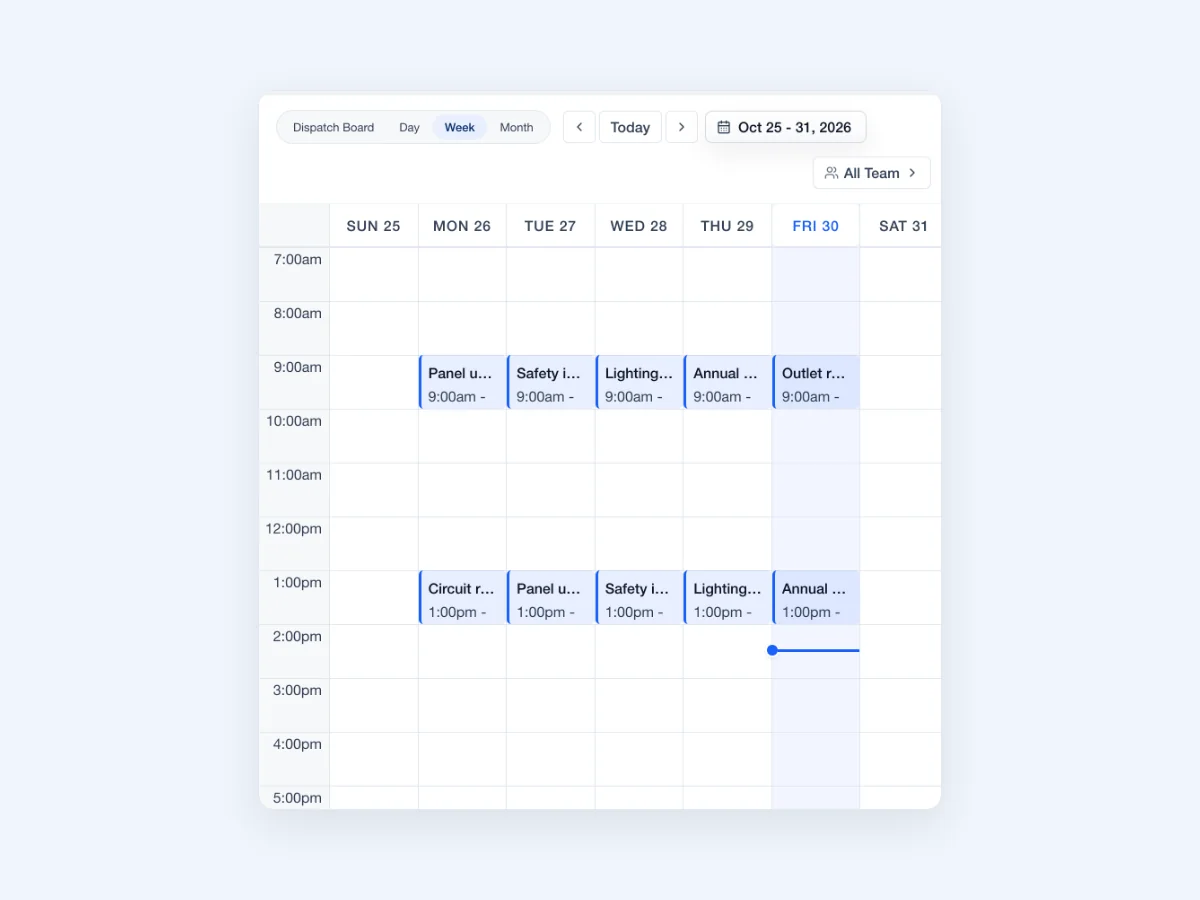 Enlarge
Actual JobsiteOn app capture with sample records. Product panel shown.
Explore Schedule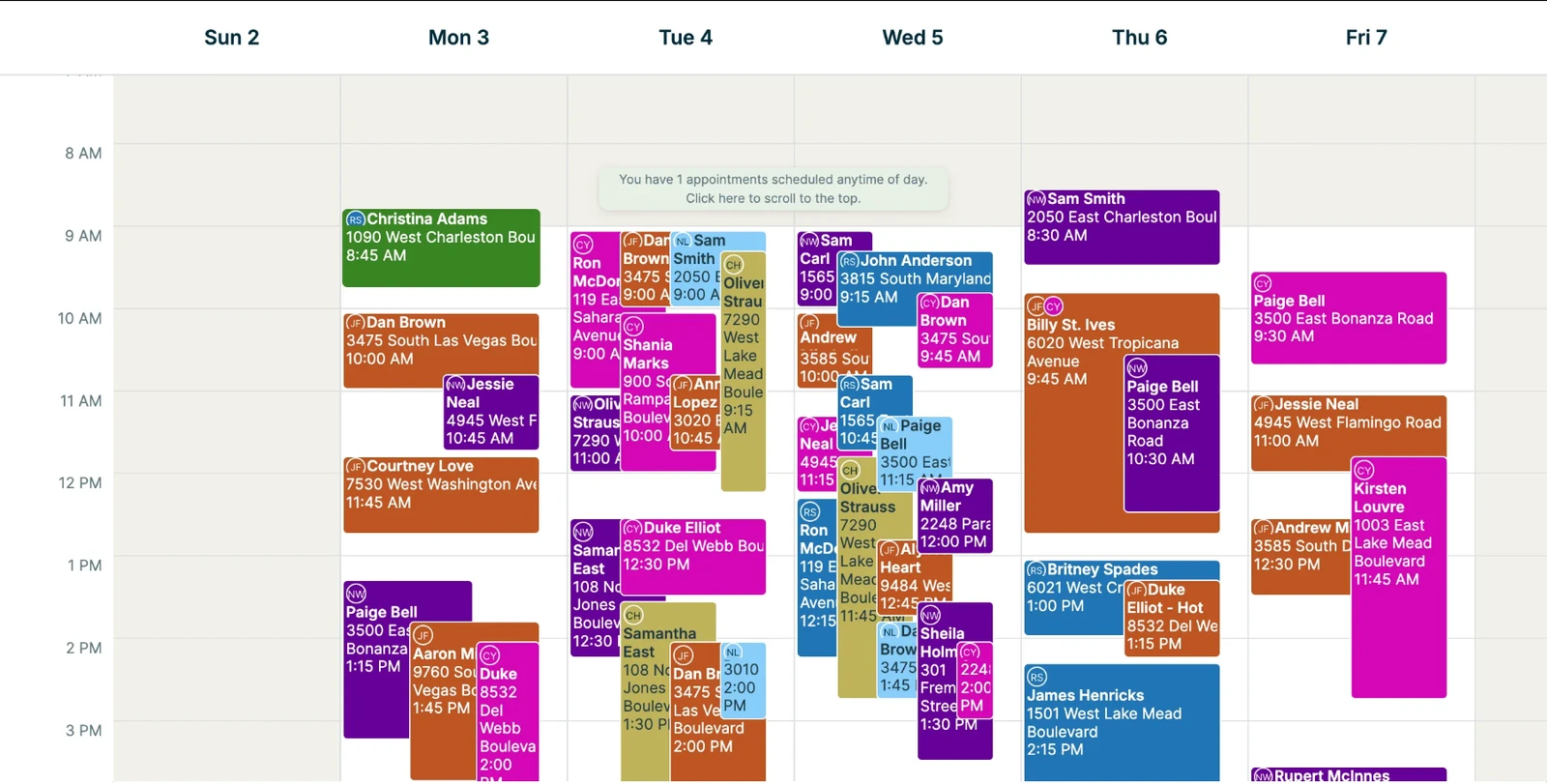 Enlarge
Jobber’s published New Schedule screenshot. The source describes this version as available to try ahead of the full rollout.
View the original sourceA good calendar needs to work when plans change. Inspect the two views, then try moving a visit and finding the customer’s latest instructions.
Vendor-published views, captured November 2, 2026. Sample data and screen scope differ. Open either image to inspect it; appearance and availability can vary by release.
The right fit for your day.
Choose around the work your team repeats. These are starting points for your evaluation, not a universal ranking.
You want the whole job in view.
Try JobsiteOn when you want to keep customer conversations, scheduled work, crew assignments and visual job records in the same working routine.
Check included productsScheduling & service work.
Shortlist Jobber for its service-business workflow across quotes, scheduling, invoicing and payments. Its scheduling tools also cover recurring visits and route planning.
Read Jobber’s product detailsCompare the work, step by step.
Both products have useful capabilities. Read the details, check the source and try the task that matters to you.
Scheduling work
Try thisBook a busy week and change one recurring visit without losing track of the others.
See visits in day, week and month views, with a separate crew dispatch board on Team and higher plans.
Product detailsScheduling includes team calendars, recurring visits and route-planning tools.
Vendor source: Jobber: scheduling softwareReading the calendar
Try thisCheck which calendar version your trial includes before judging the screenshots.
The calendar and Dispatch board offer time-based and crew-based views of the work.
Product detailsThe New Schedule documents day, week and month views plus map and unscheduled-appointment panels. Availability is still described as early access.
Vendor source: Jobber: New Schedule overview and availabilityQuotes and invoices
Try thisFind the approved quote while preparing the job’s final invoice.
Sales and Payments keep the quote, invoice and payment record close to the job.
Product detailsQuoting, invoicing and payments are part of the published product plans.
Vendor source: Jobber: plans, users and billing optionsThe crew’s phone
Try thisUse the phone your crew owns. Check photo uploads and the job view on that device.
Native iPhone and iPad apps are listed alongside the web and Mac app. Check the download page for current devices.
Product detailsJobber offers mobile apps for iOS and Android, with access to field schedules and work details.
Vendor source: Jobber: scheduling softwarePlan and add-on boundaries
Try thisList each must-have feature next to the plan that actually includes it.
Connect is included from Starter. Capture and Dispatch start at Team; plan allowances still apply.
Product detailsUsers, automation, integrations and optional products differ across plans and billing choices.
Vendor source: Jobber: plans, users and billing optionsKeep the small handoffs from piling up.
In JobsiteOn, follow a customer request into the work and back to the office. Judge how easily another person can pick up where you left off.
- 01
Read the conversation
Find the customer’s message and the work context.
Explore communications - 02
Plan the visit
Choose a time and assign the crew.
Explore dispatch - 03
Record the result
Keep site photos and clips with the job.
Explore capture - 04
Finish the job
Use the work record to complete the billing.
Explore payments
Product availability depends on your plan. See plans, user limits and job allowances.
Price the way you work.
Jobber’s displayed prices vary with billing commitment, plan and user configuration. Compare the total for your crew, required automations and integrations. Use the equivalent JobsiteOn plan and the same billing term.
JobsiteOn, billed monthly
- Starter
- $29/month
- Team
- $99/month
USD. User and job allowances apply. Capture and Dispatch start at Team.
Ask before you commit
- Is the price monthly, annually prepaid or a monthly payment on an annual term?
- Does the chosen plan include your office users and field crew?
- Are the automation and accounting connections you need included?
Compare the same users and billing term. Confirm taxes, processing fees, add-ons and contract conditions.
Give both products the same test.
Use a real job and involve the people who do the work. Check each step when you have tried it in both products, then take the checklist with you.
Start Free TrialA few useful answers.
Does Jobber include routing and recurring scheduling?
Yes. Jobber’s scheduling page documents recurring visits and route-planning tools. Compare those workflows directly instead of relying on a table that marks them as missing.
Why might Jobber’s calendar look different in my account?
The screenshot comes from Jobber’s New Schedule help article, which describes an early-access version. Your account may use a different view or release. Check the source and the version available in your trial.
Can I use JobsiteOn with an Android crew?
JobsiteOn has web access, and its download page currently lists native iPhone, iPad and Mac apps. A native Android app is not listed. Test the web workflow on your crew’s Android devices before choosing it.
Sources you can check.
Written by JobsiteOn using its product documentation and the official vendor pages linked here. Reviewed November 2, 2026. This is a product guide, not an independent benchmark or a claim that one tool suits every team.
Screenshots preserve the published interface and original annotations. Capture dates do not establish release versions. Third-party names and images belong to their owners; no affiliation or endorsement is implied.
Screenshot credits and capture methodPut JobsiteOn to work.
Bring a real quote, a real visit and the people doing the work. See how it fits your day.