


Electrical / Job documentation
Electrical closeout notes the office can act on
Use this electrical job closeout checklist to hand over completion notes, photos, open work, customer decisions and billing details without another call.

The quick answer
What belongs in an electrical job closeout record?
An electrical closeout record should identify the job and location, describe completed work, link relevant photos and test or inspection records, list unresolved items, record customer decisions and explain what is ready to bill. Give each remaining action a named owner. Keep work completion, inspection status and payment status separate.
- Write the handoff while the job is still fresh.
- Make unfinished work as clear as completed work.
- A finished visit does not automatically mean inspected, invoiced or paid.
The workflow at a glance
Four records to check before closing the file
- 01
Work
Completed scope and remaining tasks
Technician - 02
Evidence
Photos and relevant test records
Technician - 03
Handoff
Customer decisions and next owner
Field + office - 04
Billing
Reviewed invoice and payment status
Office
Write a note that can stand on its own
'All done' tells the office very little. Name the property and work area, explain what was completed and point to the evidence. Use the job reference so the next person does not need to search a technician's messages to identify the visit.
Keep observations separate from conclusions. If a condition still needs testing, inspection or a return visit, say that plainly. This guide covers the office handoff, not electrical testing procedures or a jurisdiction's inspection requirements.
Give photos a location and a purpose
A useful photo answers a question. A wider view identifies the work area, a closer view shows the relevant detail and a finished-work view explains the result. Add a short caption so the office can connect the image with the note.
Do not use a photograph as a substitute for a required test record or inspection document. Attach or reference those records separately when they apply. Keep images tied to the correct visit, especially when a project has several phases.
- Label the room, equipment or work area consistently.
- Explain what the reader should notice instead of using captions such as 'photo 1.'
- Keep unrelated people, private information and other customers' records out of the material you share.
Make open items impossible to mistake for finished work
List missing parts, follow-up work, questions awaiting a customer answer and inspection-related actions separately. Assign an owner and a next step. 'Waiting' without an owner simply moves the problem to the next person who opens the job.
For example, a visit may be finished while an inspection document is still outstanding. Record the visit as finished according to your workflow and keep the outstanding requirement visible. Do not mark an inspection approved based on a scheduled date or an expectation.
| Unclear note | Actionable handoff |
|---|---|
| Need to come back | [Task] remains. [Person] will arrange the return visit by [date]. |
| Inspection sorted | Inspection [scheduled / completed / awaiting result]. Record: [reference]. |
| Customer knows | [Name] was told [specific update] through [channel] at [time]. |
- Need to come back
- [Task] remains. [Person] will arrange the return visit by [date].
- Inspection sorted
- Inspection [scheduled / completed / awaiting result]. Record: [reference].
- Customer knows
- [Name] was told [specific update] through [channel] at [time].
Give the office enough detail to prepare the invoice
The billing handoff should identify completed scope, approved changes and work that was removed or postponed. Describe materials and quantities clearly enough for the office to select the correct billable items. Keep internal cost notes separate from the explanation the customer needs.
Before sending, the office should compare the draft invoice with the agreed quote and completion record. Check the contact, property, quantities, previous payments and due date. Resolving an unexplained line item internally avoids making the customer reconcile the job for you.
Keep the job record and billing record connected
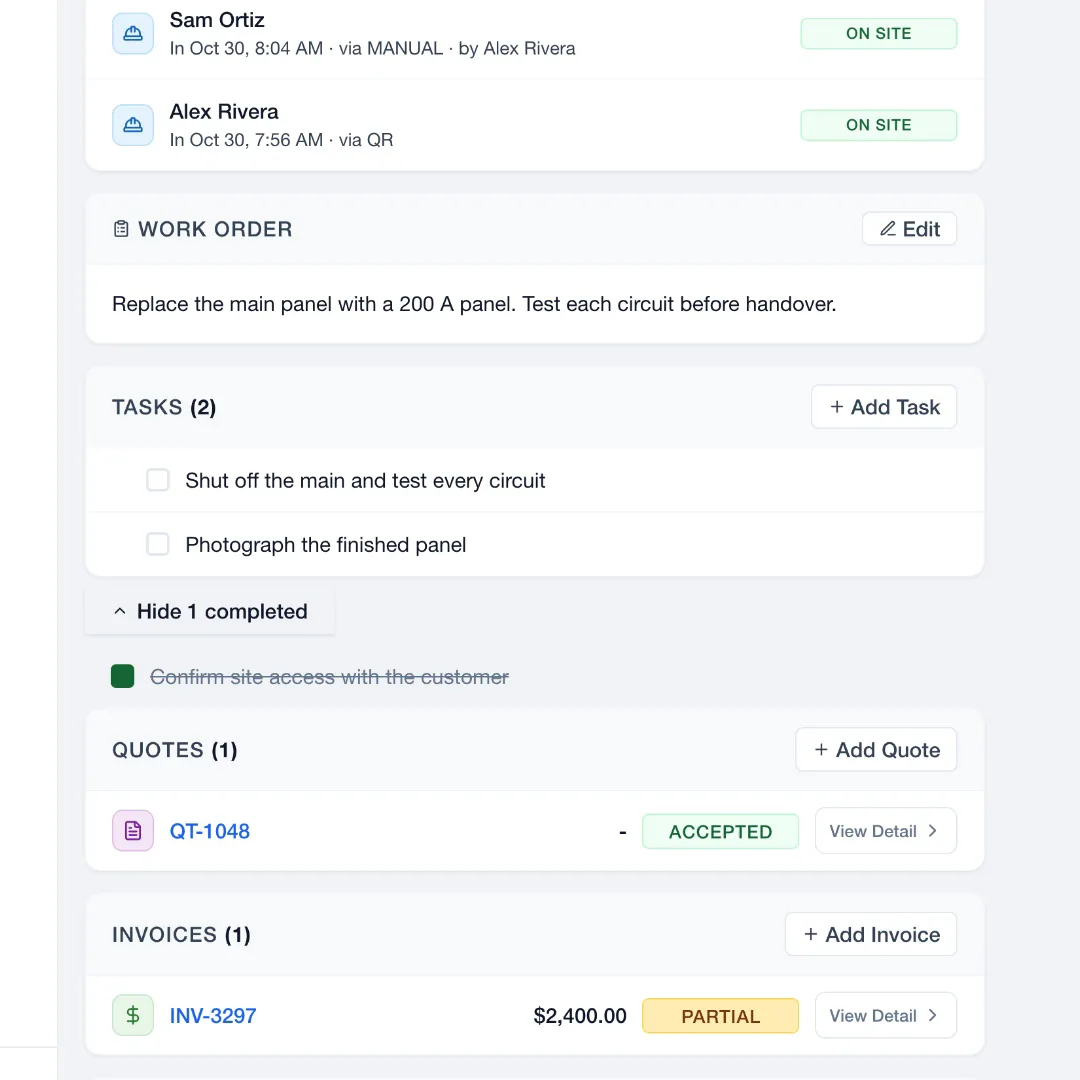
Use JobsiteOn's job record for the work context, then create the invoice from that job. The invoice starts with the contact, property and job reference; you add the billable items. Check the draft against the accepted scope and field notes before sending it.
For a customer photo handoff, Capture share links can show a selected photo, gallery, report or project without giving access to the rest of the workspace. Choose the scope and sharing controls deliberately. The source guides below describe these product steps.
Take it to the next job
Electrical job closeout checklist
- Confirm the job reference, property and work area.
- Describe completed work and quantities.
- Attach labelled photos and relevant test or inspection records.
- List unfinished work with an owner and next action.
- Record customer updates, approvals and declined work.
- Identify completed scope and approved changes for billing.
- Review the invoice separately from work and inspection status.
- Check exactly which documents or photos the customer will receive.
See it in JobsiteOn
Service, connected to the job.
Keep the job's work, notes and context together so the office can pick up where the field team left off.
Common questions
Can photos replace an electrical test or inspection record?
No. Photos provide visual context. Keep the test results, inspection documents and other records required for the work separately, with links or references from the job.
Should a job be marked paid when the technician finishes?
No. Completed work, an issued invoice and a received payment are different events. Update each record based on what has actually happened.
What should a return-visit note say?
State the unfinished task, why it remains, who owns it and the next action or expected date. Link any needed parts, customer decision or supporting photo.
Sources and editorial notes
Published by JobsiteOn. This guide combines practical workflow suggestions with the product instructions below. Examples and amounts are illustrative. Product details were checked on .
- Create an Invoice from a Job
Product reference for linked billing records and manual line-item review.
- Share Photos with a Link
Product reference for selecting what a customer can see and controlling shared access.
The cover photo is by jarmoluk, used under the Pixabay Content License. Photos depict stock scenes. Screenshots show the real app with sample records, not customer results.
Suggest a correctionKeep the work moving.
All guides
Job photos that explain the work
Build a useful job photo record with location context, detail shots, honest before-and-after pairs, upload checks and a customer-sharing checklist.
Read the guide
Keep the plumbing quote and final invoice in step
A plumbing estimate-to-invoice checklist with scope examples, change documentation and a final review that catches missing or unapproved work.
Read the guidePut the workflow to work
Your next job, in one place.
Keep the quote, schedule and work record connected.