


All trades / Dispatch & scheduling
Build a field service schedule with room for the real day
A practical field service scheduling guide with a capacity calculation, appointment checklist and a method for handling changes without overbooking.

The quick answer
How do you build a realistic field service schedule?
Start with each technician's actual available hours, then account for breaks, travel, parts collection, job duration and known constraints. Book fixed appointments first, group flexible work where practical and keep capacity for the kinds of changes your business sees. Confirm the customer, location, access and assignee before treating a visit as ready.
- Schedule the whole visit, including travel and access.
- Use your own job history to improve duration estimates.
- Check both the calendar and the assignment when plans change.
The workflow at a glance
A usable appointment has four parts
- 01
Time
A realistic visit and travel allowance
Calendar - 02
Person
An available technician with the right skills
Assignment - 03
Readiness
Parts, access and approved scope
Job record - 04
Agreement
A confirmed customer arrival window
Communication
Calculate bookable time before counting jobs
An eight-hour shift is not eight hours of customer appointments. Start with the time the person is actually available. Subtract breaks, travel, meetings, parts collection and other known work before filling the calendar.
For an illustrative eight-hour day, start with 480 minutes. Subtract a 30-minute break, 60 minutes of travel and 30 minutes for loading and paperwork. That leaves 360 minutes. If you reserve 60 minutes for likely changes, you have 300 minutes to book. Replace every number with your own conditions; this is a planning example, not a utilization target.
| Example allocation | Minutes |
|---|---|
| Available shift | 480 |
| Break | 30 |
| Travel | 60 |
| Loading and paperwork | 30 |
| Reserved for changes | 60 |
| Remaining appointment capacity | 300 |
- Available shift
- 480
- Break
- 30
- Travel
- 60
- Loading and paperwork
- 30
- Reserved for changes
- 60
- Remaining appointment capacity
- 300
Estimate the visit, not just the repair
Use completed jobs of a similar type to estimate duration. Include the time needed to gain access, review the problem, explain the result and finish the work record. Separate a routine visit from a visit with uncertain scope rather than assigning both the same default length.
When a job runs long, record why. Was the original scope incomplete, were parts missing, was access delayed or did the work itself take longer? Those reasons help you adjust the next estimate without inflating every appointment.
Place fixed constraints before flexible work
Book visits with limited access windows or other fixed constraints first. Then add flexible work around the remaining capacity. Consider location and skills together: a nearby appointment is not useful if the available technician cannot perform it.
Keep jobs waiting for approval, parts or an access confirmation visibly separate from confirmed visits. A tentative slot can be useful, but the office and technician should be able to tell that something still needs to happen.
- Confirm the customer's availability before promising a narrow arrival window.
- Include travel between the actual properties, not just distance from the office.
- Check absences and existing assignments before adding work.
- Name the person responsible for clearing each blocked appointment.
Change the plan once, then confirm it everywhere
When a visit moves, check the appointment, assignment and customer message. Updating one does not guarantee the others are correct. Review the next appointment too: an extra half hour can create a conflict later in the day.
Keep the original reason for the change in the work record. This helps the office answer questions and prevents a later dispatcher from moving the visit back into an unsuitable slot.
Review missed assumptions each week
Look at which appointments moved and why, rather than judging the schedule only by how full it looked. Compare planned and actual durations for common job types. Check whether travel, access delays or incomplete job details account for the repeated gaps.
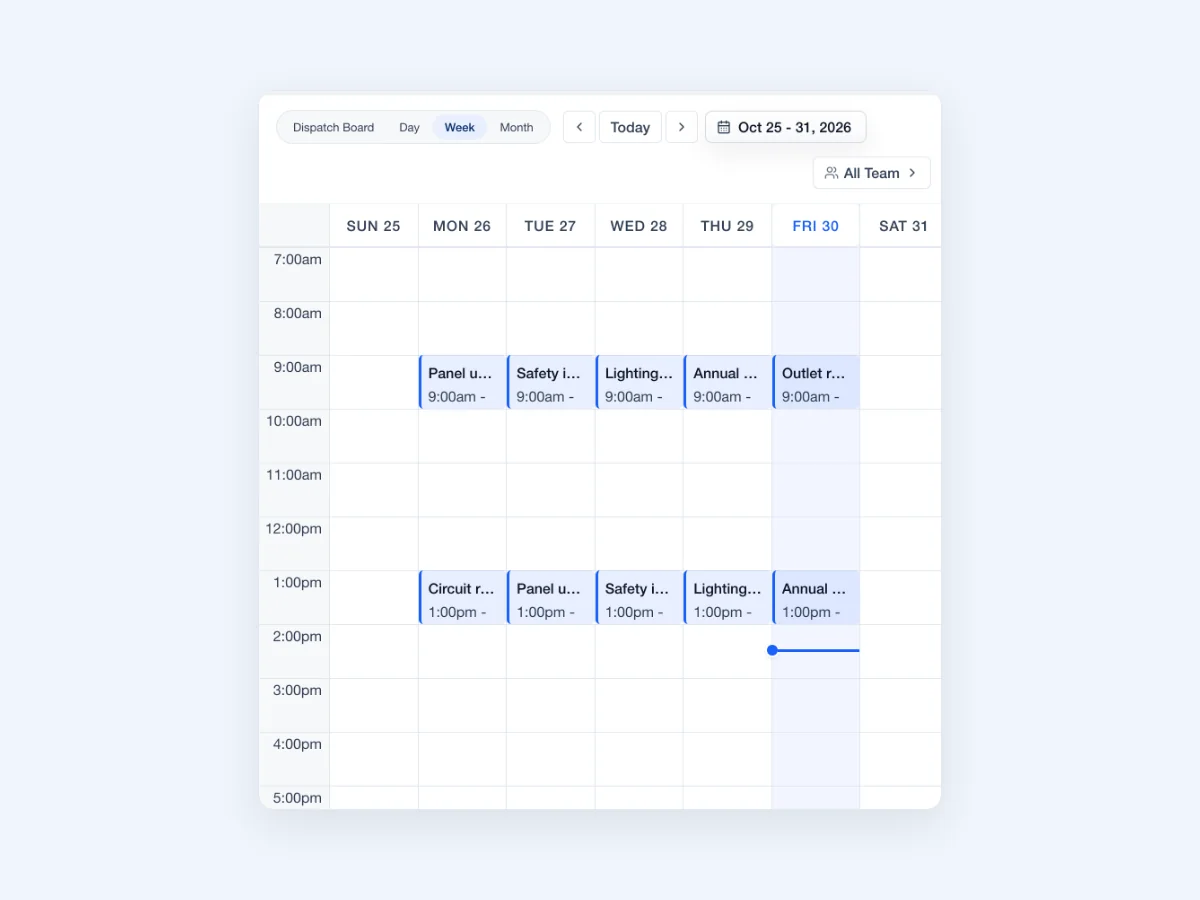
In JobsiteOn, use the calendar views for time-based planning and the dispatch board for daily assignment. After changing a visit, open the appointment and verify its saved date, time and assigned team. Review the calendar for any new conflicts.
Take it to the next job
Before confirming an appointment
- Check the technician's available hours and existing work.
- Estimate on-site time using comparable completed jobs.
- Allow for travel, breaks and known non-visit work.
- Confirm scope, parts, access and customer availability.
- Assign the technician and set the appointment window.
- Identify any remaining condition before the visit is ready.
- Tell the customer the agreed window and callback contact.
- Review downstream appointments after any change.
See it in JobsiteOn
Schedule, connected to the job.
Review the day, week or month, then keep each visit connected to its job and assigned team.
Common questions
How many jobs should a technician do in a day?
There is no reliable universal number. Divide actual appointment capacity by realistic visit durations, then account for travel, skills and fixed windows. A day of short nearby visits is different from a day of complex work across town.
Should every free calendar slot be filled?
Only when the work fits the person's availability, travel and job requirements. Use your own history of urgent calls and overruns to decide how much capacity to leave unbooked.
What should you check after rescheduling a job?
Verify the new date and time, the assigned technician, customer confirmation, parts and access. Review the technician's next appointment for a new conflict.
Sources and editorial notes
Published by JobsiteOn. This guide combines practical workflow suggestions with the product instructions below. Examples and amounts are illustrative. Product details were checked on .
- Use the Dispatch Board
Product reference for calendar views and the daily dispatch workflow.
The cover photo is by StartupStockPhotos, used under the Pixabay Content License. Photos depict stock scenes. Screenshots show the real app with sample records, not customer results.
Suggest a correctionKeep the work moving.
All guides
An HVAC dispatch checklist for a day that changes
Plan emergency calls and maintenance visits with an HVAC dispatch checklist, a worked scheduling example and a customer update template.
Read the guide
Electrical closeout notes the office can act on
Use this electrical job closeout checklist to hand over completion notes, photos, open work, customer decisions and billing details without another call.
Read the guidePut the workflow to work
Your next job, in one place.
Keep the quote, schedule and work record connected.