


HVAC / Dispatch & scheduling
An HVAC dispatch checklist for a day that changes
Plan emergency calls and maintenance visits with an HVAC dispatch checklist, a worked scheduling example and a customer update template.
The quick answer
What should an HVAC dispatch checklist include?
An HVAC dispatch checklist should capture the service address, customer contact, reported problem, urgency, equipment details, access instructions, technician skills, parts availability and arrival window. Before assigning a call, check the technician's existing work and travel time. After a change, confirm the assignment and tell the affected customers.
- Check readiness before filling an open slot.
- Treat assignment, appointment time and customer updates as separate tasks.
- Give every unfinished call an owner and a next action.
The workflow at a glance
From incoming call to a confirmed visit
- 01
Capture
Problem, address and callback number
Office - 02
Check
Skills, parts, travel and open time
Dispatcher - 03
Assign
Named technician and visit window
Dispatcher - 04
Confirm
Crew acknowledgement and customer update
Office + field
What do you need before assigning a call?
Capture what the customer reports before promising a visit. A short description such as 'upstairs is warm; downstairs is cooling' is more useful than 'AC issue.' Keep the customer's observations separate from a diagnosis the technician has not made.
Confirm the actual service location, including the unit or suite. Ask who will provide access, how to reach them and whether the equipment is accessible. The person who called may not be the person at the property.
- Record the equipment type and known model details when available. Do not delay the call just to fill every field.
- Note existing job history, callbacks and any parts already ordered.
- Use your company's escalation process for urgent reports. A priority label alone does not decide who should attend.
Build the morning plan around work that is ready
Review today's commitments before assigning overnight calls. Check absences, technician skills, appointments with fixed access windows and jobs waiting for parts. A blank space on a calendar is not enough: the person must also have time to travel, get access, do the work and record the result.
Keep waiting-for-parts work separate from work that can start. Put a named owner and a follow-up date on each blocked call so it does not disappear between the office and the warehouse.
| Check | Decision it supports |
|---|---|
| Skills and equipment | Who can handle the reported work? |
| Parts and access | Is this visit ready to happen? |
| Existing appointments and travel | Can it fit without breaking a promise? |
| Customer availability | Which arrival window can you confirm? |
- Skills and equipment
- Who can handle the reported work?
- Parts and access
- Is this visit ready to happen?
- Existing appointments and travel
- Can it fit without breaking a promise?
- Customer availability
- Which arrival window can you confirm?
When an urgent call interrupts the day
Replan the affected part of the day, then contact the people whose plans changed. Compare a technician's current location, remaining work and skills. Do not choose someone only because they have the fewest appointments.
For example, suppose a technician has a 90-minute opening. A call needs 60 minutes on site and 40 minutes of total travel. That is 100 minutes before any contingency, so it does not fit. Move a flexible visit with the customer's agreement, choose another available technician or give an honest later window. These numbers illustrate the calculation; use your own job history.
Close the loop after every reassignment
Confirm that the receiving technician has seen the job details, access notes and latest customer message. Reassigning the record is only one part of the handoff. Check the visit time separately and update any downstream appointment that now conflicts.
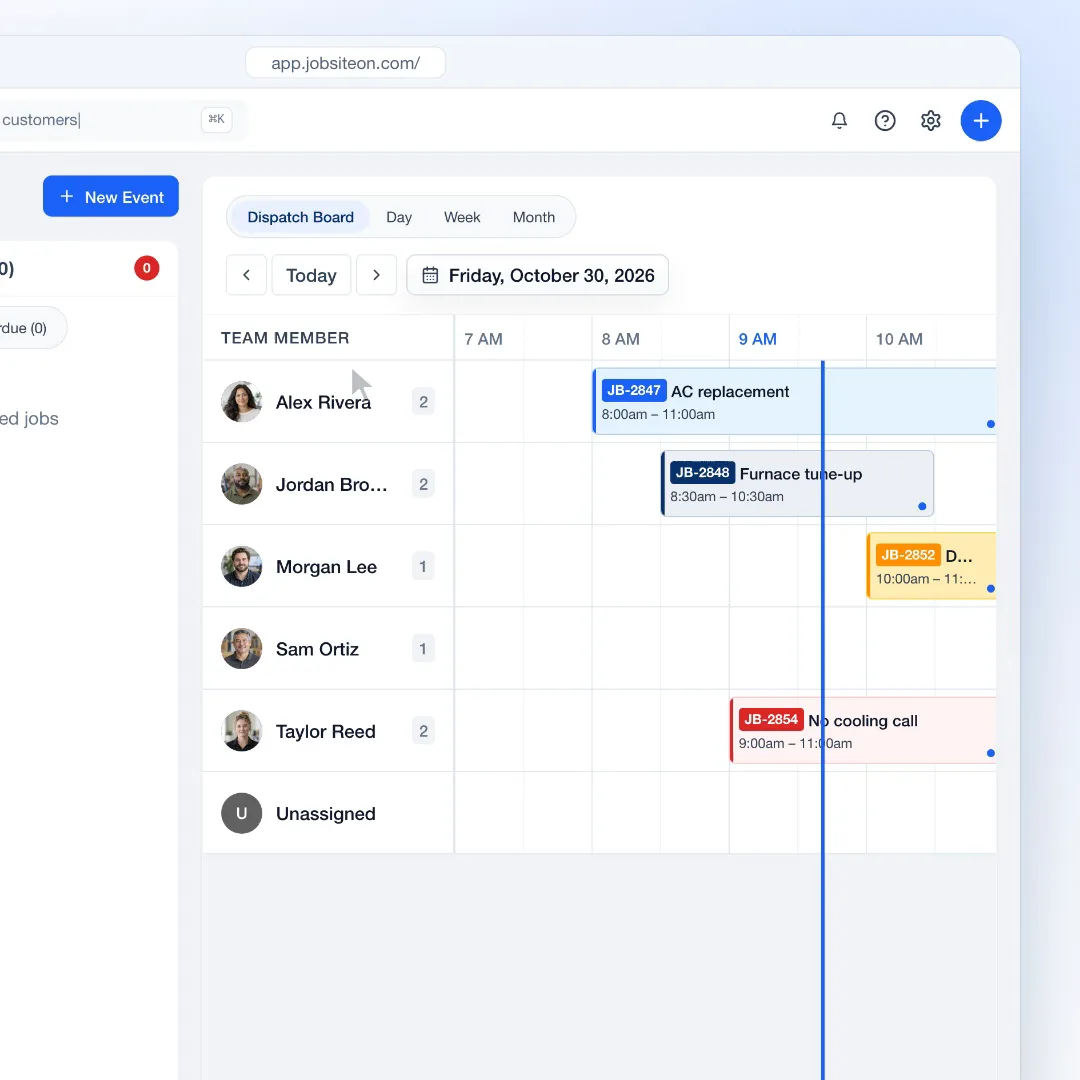
In JobsiteOn, the dispatch board groups scheduled work by team member on a timeline. After moving work, open the record and verify both the assigned technician and the saved time. Use the calendar to review the effect on the rest of the day.
Leave tomorrow's dispatcher a usable record
At the end of the day, review unassigned work, incomplete visits, ordered parts and customers awaiting a response. Every exception needs a short note that answers three questions: what happened, who owns the next step and when they will act.
Track the reasons visits moved for a week. Separate customer changes, missing parts, travel overruns and work that took longer than estimated. This gives the next planning session something concrete to change, rather than a vague target to fit in more calls.
Take it to the next job
Daily HVAC dispatch checklist
- Confirm today's technicians, absences and skills.
- Review unassigned calls and fixed appointment windows.
- Verify address, callback number, access and reported problem.
- Check equipment notes, parts and job history.
- Allow time for the job, travel and known constraints.
- Assign the technician and verify the appointment time.
- Confirm the handoff and contact customers affected by changes.
- Give unfinished work an owner and a follow-up date.
See it in JobsiteOn
Dispatch, connected to the job.
See assigned and unassigned work together, then open the linked job when a technician needs more context.
Common questions
What is the difference between scheduling and dispatch?
Scheduling reserves a date and time for a visit. Dispatch assigns the work to a technician or crew and coordinates changes during the day. A complete handoff needs both an appointment and an assignee.
How much time should you leave for emergency HVAC calls?
There is no fixed buffer that fits every shop. Review your own urgent-call volume, job durations and travel time, then leave capacity that reflects those patterns. Revisit it when seasonality or staffing changes.
What should you check after moving work on the dispatch board?
Check the saved assignee, date and time on the appointment, then review any affected work later in the day. Confirm the handoff with the technician and update the customer when their arrival window changes.
Sources and editorial notes
Published by JobsiteOn. This guide combines practical workflow suggestions with the product instructions below. Examples and amounts are illustrative. Product details were checked on .
- Use the Dispatch Board
Product reference for the dispatch workflow and reviewing assigned work.
The cover photo is by Jose_pachecoph, used under the Pixabay Content License. Photos depict stock scenes. Screenshots show the real app with sample records, not customer results.
Suggest a correctionKeep the work moving.
All guides
Build a field service schedule with room for the real day
A practical field service scheduling guide with a capacity calculation, appointment checklist and a method for handling changes without overbooking.
Read the guide
Job photos that explain the work
Build a useful job photo record with location context, detail shots, honest before-and-after pairs, upload checks and a customer-sharing checklist.
Read the guidePut the workflow to work
Your next job, in one place.
Keep the quote, schedule and work record connected.